
クロスプラットフォームのデスクトップアプリ実行環境 Atom Shell が Electron に改名
JavaScript で Windows/Mac/Linux デスクトップアプリを開発できる「Atom Shell」が、「Electron」に改名したとのこと(Atom Shell is now Electron)。
Electron は、Node.js のようなデスクトップの実行環境を提供し、GUI 部分は Chromium ブラウザーを利用するため、Web 技術を用いてデスクトップアプリが開発できます。
また、アプリの自動更新、Windows インストーラー、クラッシュレポート、通知機能など、ネイティブアプリの機能が JavaScript API として用意されています。
もともと、Atom Shell は、エディター「Atom」のために用意されたものですが、現在では、Slack などで使用されているようですね。
クイックスタート: Electron を試す
Electron をダウンロード して、ドキュメント のチュートリアルを試してみました。
用意するファイルは次の package.json, main.js, index.html。
{
  "name"    : "your-app",
  "version" : "0.1.0",
  "main"    : "main.js"
}var app = require('app'); // Module to control application life.
var BrowserWindow = require('browser-window'); // Module to create native browser window.
// Report crashes to our server.
require('crash-reporter').start();
// Keep a global reference of the window object, if you don't, the window will
// be closed automatically when the javascript object is GCed.
var mainWindow = null;
// Quit when all windows are closed.
app.on('window-all-closed', function() {
if (process.platform != 'darwin')
app.quit();
});
// This method will be called when Electron has done everything
// initialization and ready for creating browser windows.
app.on('ready', function() {
// Create the browser window.
mainWindow = new BrowserWindow({width: 800, height: 600});
// and load the index.html of the app.
mainWindow.loadUrl('file://' + __dirname + '/index.html');
// Emitted when the window is closed.
mainWindow.on('closed', function() {
// Dereference the window object, usually you would store windows
// in an array if your app supports multi windows, this is the time
// when you should delete the corresponding element.
mainWindow = null;
});
});<!DOCTYPE html>
<html>
<head>
<title>Hello World!</title>
</head>
<body>
<h1>Hello World!</h1>
We are using io.js <script>document.write(process.version)</script>
and Electron <script>document.write(process.versions['electron'])</script>.
</body>
</html>実行
「electron your-app」と実行します(your-app は、ファイルのあるフォルダー名)。
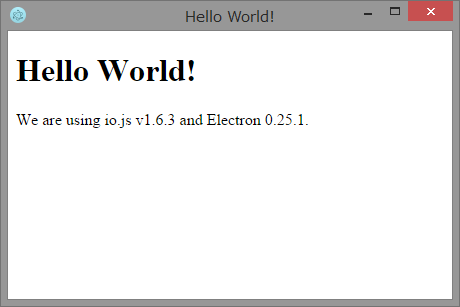
簡単ですね。
デスクトップ環境の統合
これだけでは、デスクトップアプリの意味がありませんが、デスクトップ環境の統合 を見ると、いろいろなネイティブ API を利用できることがわかります。
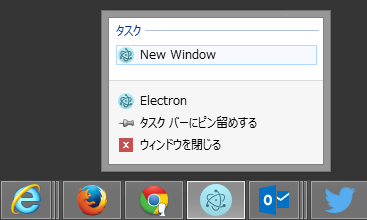
次のように書き足すと、Windows のユーザータスクが利用できました。
app.setUserTasks([
  {
    program: process.execPath,
    arguments: '--new-window',
    iconPath: process.execPath,
    iconIndex: 0,
    title: 'New Window',
    description: 'Create a new winodw',
  }
]);
おわりに
今回は改名ということなので、以前からの「Atom Shell」で検索すると、日本語情報もいろいろと出てきます。Web 技術でクロスプラットフォームな、デスクトップアプリを作りたくなったら Electron を試してみるのもいいかもしれません。
余談: Atom エディターで TypeScript 入門。
Atom といえば、4/22 に連載を開始した「TypeScriptってどんなもの? プロ生ちゃんと始めてみよう!」。Atom をインストールして、環境構築までしているので、こちらもチェックしてくださいね。
プロ生ちゃんの背景+ボイスを設定できる Atom 拡張「atom-pronama-chan」もおすすめです。
関連する記事
- 2015-01-08 背景にプロ生ちゃん — あのアプリの背景に画像を表示する方法まとめ
- 2015-04-30 Atom プロ生ちゃん拡張が表情変更対応!
- 2015-04-30 Visual Studio Code のテーマを変更する + プロ生ちゃんを表示
- 2016-02-12 Twitterのトレンドをデスクトップに表示「SteamTrend」